
KidMint

For parents and kids, ages 5–18

KidMint

Chores kids finish. Rewards they'll want to earn.

KidMint is two apps in one. Parents get a calm dashboard. Kids get a coin-and-reward world written for their age. You set the jobs and the treats. You still say yes to every coin.

Free to start · iOS and Android · Set up in under five minutes

Coming soon on the App Store and Google Play

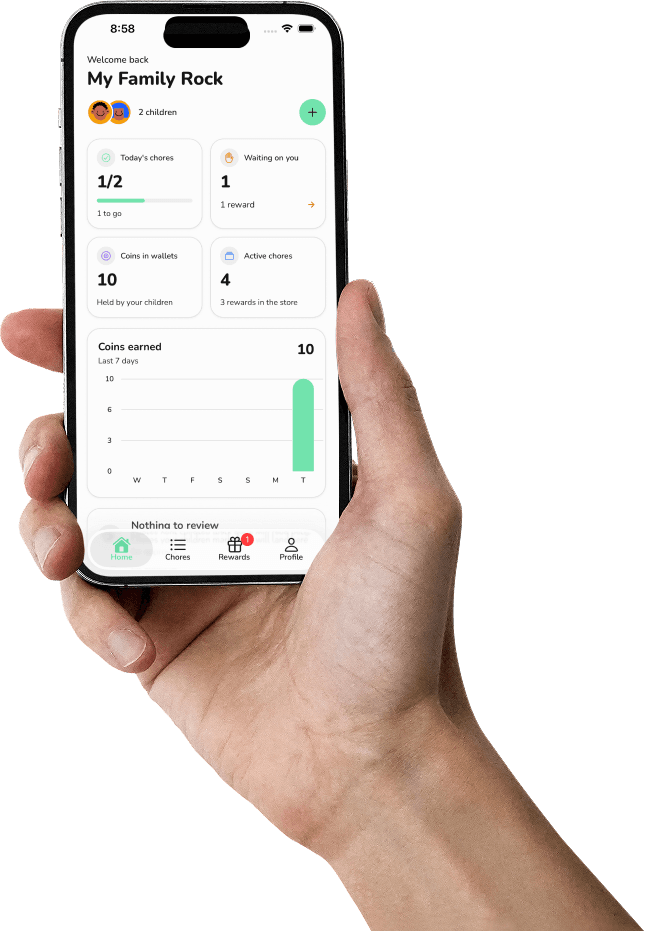
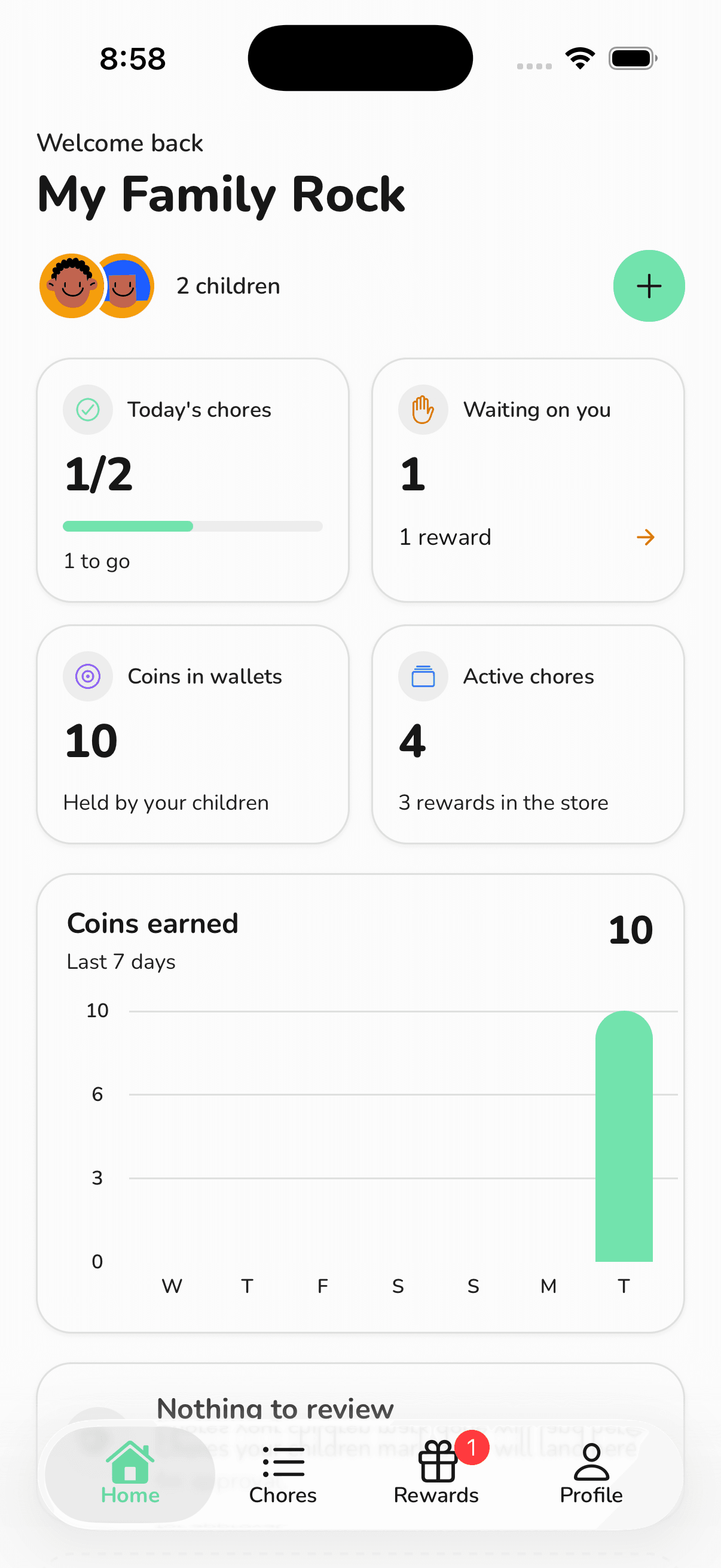
Parent Home
Child Today — Sprout

Parents stay in charge. Kids get a real app of their own — not a tiny corner of yours.

Sound familiar?

You ask them to make their bed. They say okay. It's still unmade at bedtime.

Charts on the fridge last a week. Pocket money turns into an argument. And the only way you know the bathroom was actually cleaned is to go and look.

KidMint gives kids a job list they can finish on their own, a reason to finish it, and a photo so you don't have to walk down the hall.

The third reminder

The work isn't unclear. The follow-through is. KidMint puts the next job in front of them, in language they can read.

“Did you actually do it?”

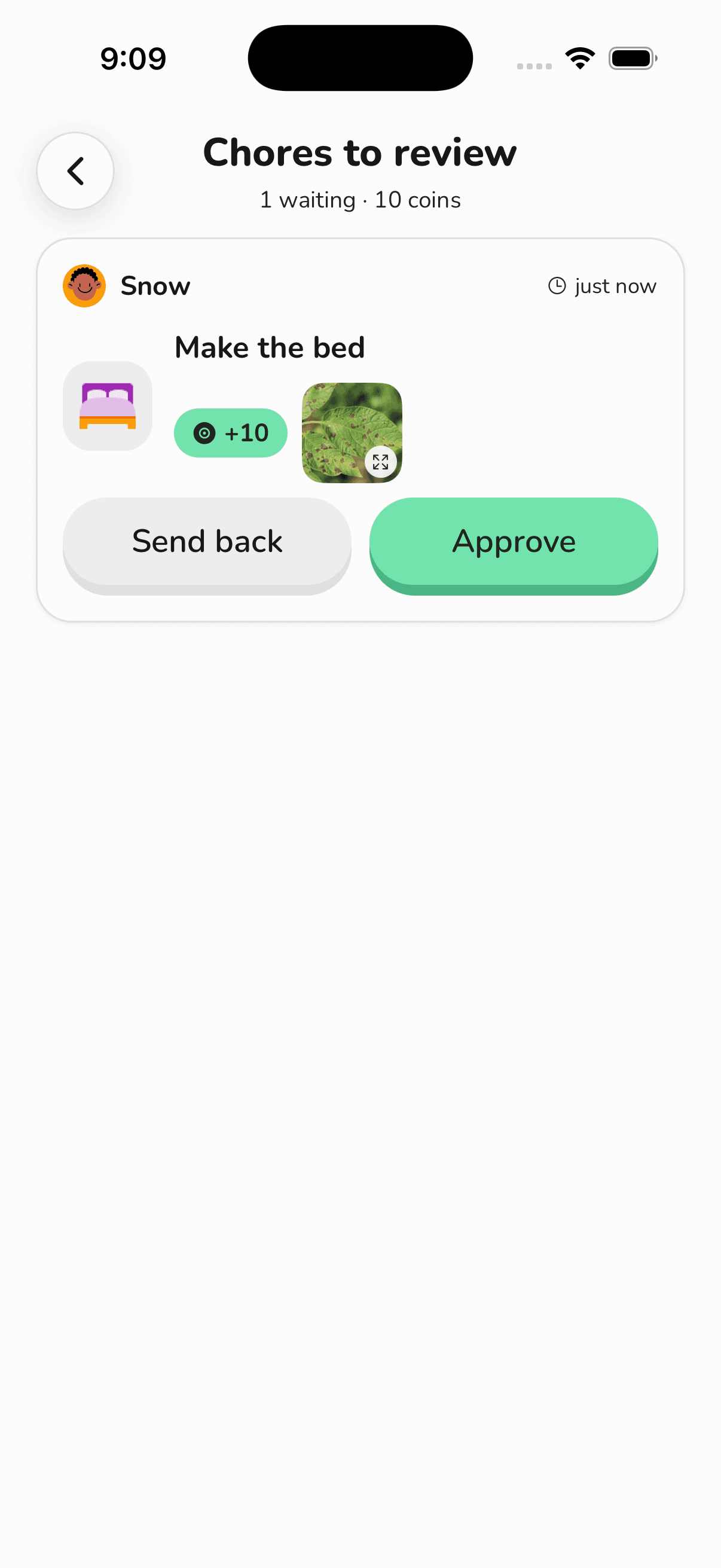
Optional photo proof. They snap the made bed. You approve from the sofa.

Rewards that don't mean anything

A gold star on a chart is not a movie night. You decide what coins are worth in your house.

How KidMint works

You set it up once. After that, the day belongs to them — and the yes still belongs to you.

New chore

The child never “buys” anything from us. They ask you. You decide.

A grown-up app. A kid app. Same family.

Open KidMint and the first thing you choose is who you are. After that, the two sides never mix. Parents get a quiet dashboard. Kids get a colourful app of their own — big buttons, their face, their coins, their jobs — written for their age, not shrunk from yours.

For parents

  • Google Sign-In. No extra password to forget.
  • Home dashboard: today's picture, coins in the house, who is waiting on a review.
  • Chore review queue with optional photos.
  • Reward catalogue and request inbox.
  • History: chores, coins, rewards.
  • Family join code to hand to a child (KID-XXXXXX).
  • Light, dark, or system theme.
  • Notification when a job is submitted or a treat is asked for.
Parent Home
Family join code

For kids

  • No email. No Google. Join code → pick your face → 4-digit PIN.
  • Today: greeting, coins, progress ring, next job.
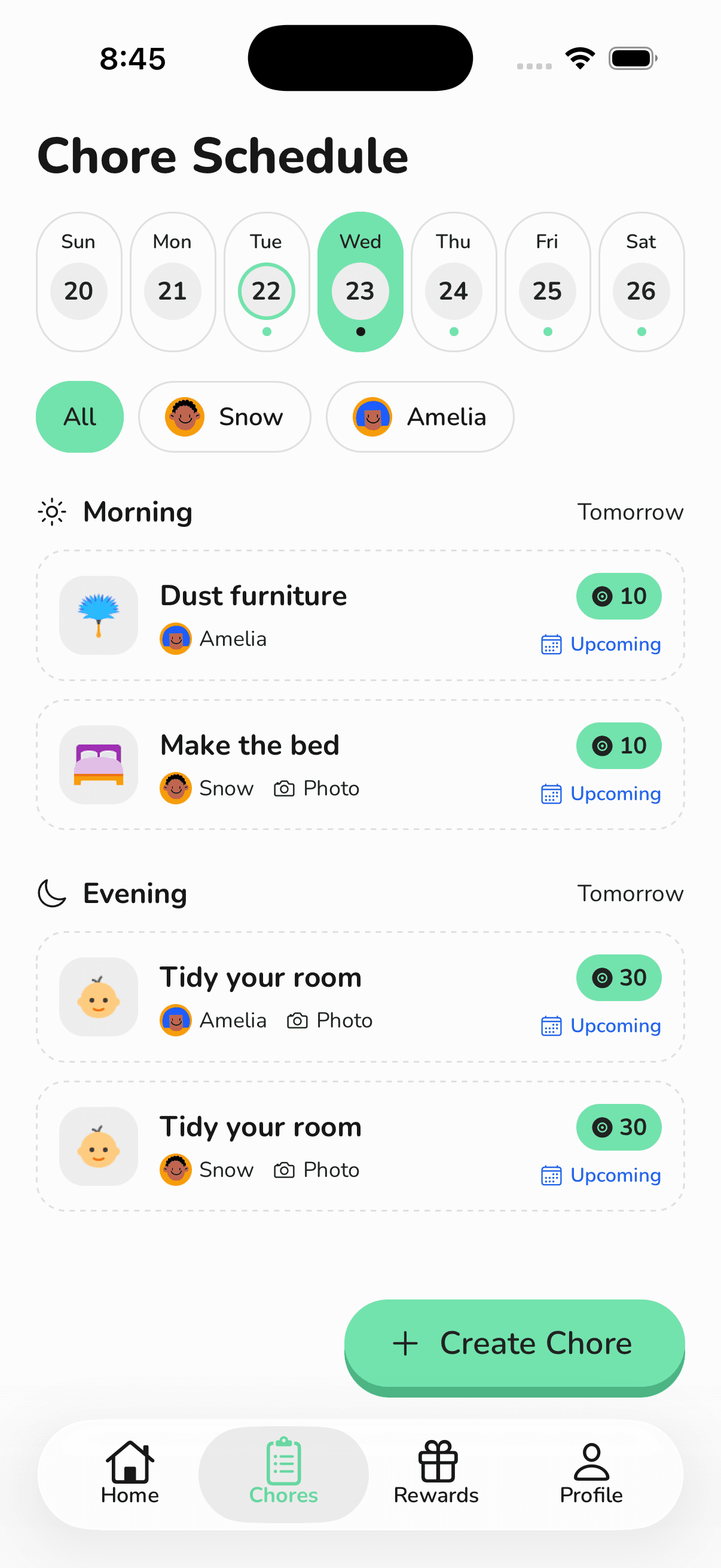
  • My Chores: the week, in their words.
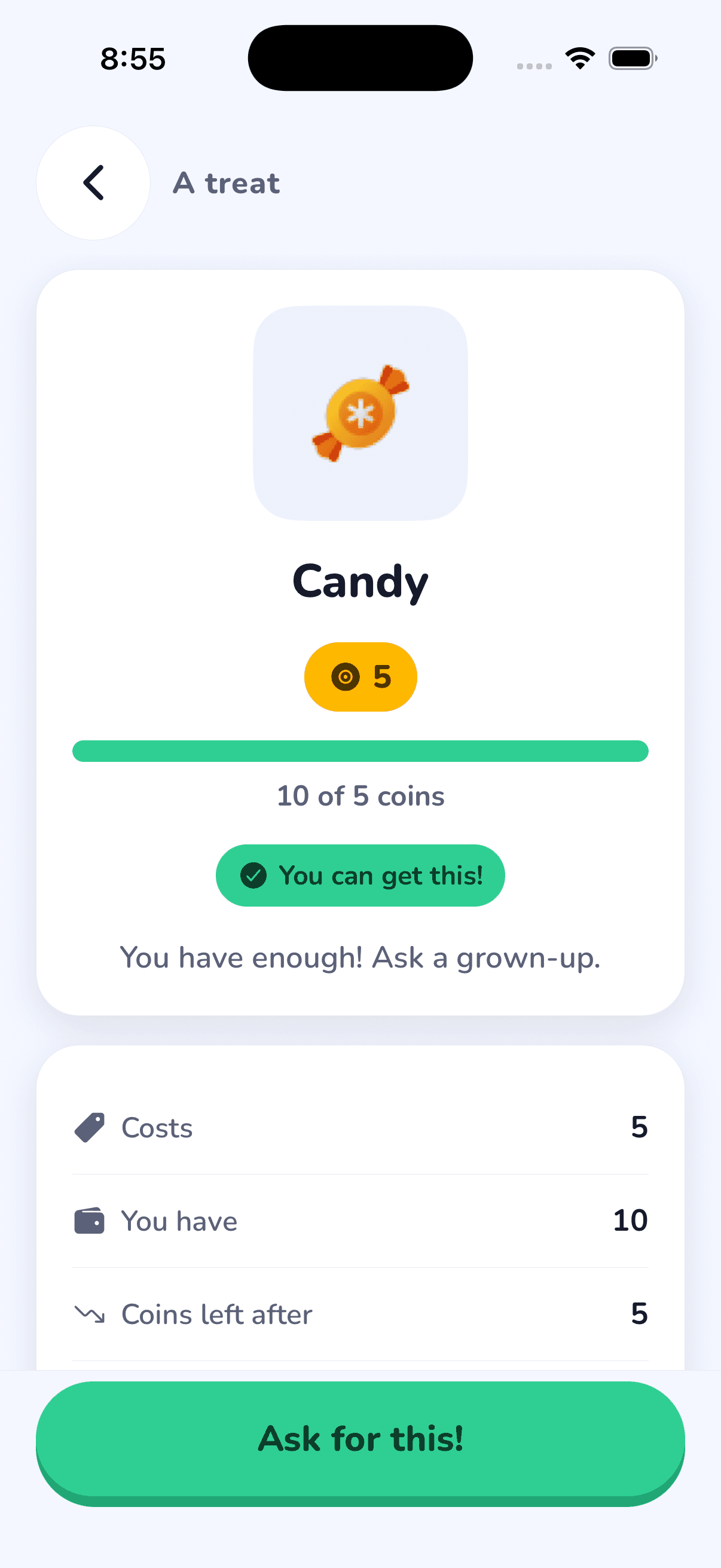
  • Store: what they can get, and how close they are.
  • Me: coins now, earned ever, jobs done, treats got.
  • Appearance: Day / Night / Auto, in language they can read.
Child join
Child Today — Sprout

Children hold their own session. A sibling cannot spend someone else's coins. Switching child is a PIN, not a shared guest mode.

The same app, in three reading ages

When you add a child, KidMint dresses their app for how old they are — type size, button size, how much fits on a screen, and the actual words. You can override it if they read ahead or want to be treated as older.

Sprout · 5–8

Sprout (5–8)

Huge type, huge tap targets, one next job at a time. Four words to a line. “I did it!” / “Ask a grown-up.” A pre-reader can still use the pictures.

Explorer · 9–13

Explorer (9–13)

Full sentences, a proper list, “Being checked”, “1 more coin to go”. Feels like a real app, not a toy.

Pro · 14–18

Pro (14–18)

Adult-adjacent. “Mark done.” “Awaiting review.” No baby talk. Same features, denser.

  • Band is automatic from birthday, with a parent override.
  • Same information architecture at every age — only scale, density, and wording change.
  • Colour is never the only signal. Every status has a word and a glyph.

See the made bed without walking down the hall

Some jobs you can take on trust. Some you want to see. Turn photo proof on for a chore and the child can't send it until there's a picture. You open the review and look. Approve, or send it back for another go — with a note, not a lecture.

  • On or off per chore.
  • Camera or photo library.
  • You see the photo on the review screen. They see “A grown-up will look at it.”
  • Photos are stored so you can check the work. They are not public, not in a feed, and not used for ads.

KidMint stores chore photos so a parent can review them. We do not run ads. We do not sell family data. Crash reports, if any, carry ids only — no names, no photos, no screen recording. Read the privacy policy

Do it
Review

Coins they can count. Treats you already believe in.

Every chore has a coin value you choose. When you approve the job, those coins land in that child's wallet. The store is yours. You pick the treats and the prices. KidMint does not sell them anything.

What coins are

  • Virtual. They live in KidMint. They are not cash, not a card, not crypto.
  • Per child. A sibling's wallet is a different wallet.
  • Parent-adjustable when life isn't a chore.
  • History on both sides.

Example rewards

Play a GameCandyIce CreamStay Up 30 Mins LateMovie NightGo to the PlaygroundBuy a BookZoo Trip$5 Allowance

$5 Allowance: You hand over the money. KidMint just tracks that they earned it.

Coins are virtual and have no cash value. KidMint is not a bank.

Wallet

Everything a grown-up needs, and nothing they don't

Home at a glance

Who's in the family, what needs a review, coins in the house, and a chart of what's been earned.

Setup checklist

Four steps on first launch: name the family, add a child, create a chore, add a reward.

Ready-made chores

Start from Make the bed, wash dishes, tidy your room, brush teeth, and more — or write a custom one.

Schedules that match a house

Daily, weekly on the days you pick, or a one-off.

Photo proof, optional

Per chore. Review from the queue. Send back with a comment if it isn't done.

Reward store you stock

Ready-made treats or your own. Assign to one child or leave for anyone.

Requests, not surprise purchases

When they can afford it, they ask. You approve. Coins move on your yes.

Push when it matters

A notification when a chore is submitted or a reward is requested. Nothing else.

History you can actually use

Chore history, coin ledger, reward history — a list, not a feeling.

Family join code

A code like KID-ABC123. That's how a child gets in on their own device.

Each child is a profile

Nickname, birthday, avatar, PIN, and Sprout / Explorer / Pro.

Leave cleanly

Delete the account and the family, join code, PINs, and proof photos go with it.

Setup checklist
Chores
Reviews
Rewards

A real app for them, not a guest login on yours

Kids don't share your Google account. They don't see your review queue. They open KidMint, pick Child, type the family code, tap their face, and enter their PIN.

  1. 1Enter the family code (KID-XXXXXX)
  2. 2Pick your face
  3. 3Enter your 4-digit PIN

That's the whole child account.

Today

Greeting, coins, a ring for the day, and the next job.

My Chores

The week, not a mysterious backlog.

Do it

The chore, the coins, the photo if needed, one button.

Store

What they can get now, and how many coins to go. Progress, not a refusal.

Ask, don't buy

“Ask for this.” Coins stay until a parent says yes.

Wallet

Coins now, what came in, what went out.

Child Today — Sprout
Do it
Store
Me

Start from real jobs, not a blank screen

Change the coins. Change the name. Turn the photo on or off. These are starting points, not a prison.

Chores

Rewards

Ready-made chores: Make the bed, Wash dishes, Do laundry, Vacuum the floor, Sweep the floor, Dust furniture, Clean up, Clean the bathroom, Brush teeth, Wash hands, Hang up towels, Set the table, Organize shoes, Water plants, Tidy your room, Fold blanket

Ready-made rewards: Play a Game, Candy, Ice Cream, Stay Up 30 Mins Late, Movie Night, Go to the Playground, Buy a Toy, Buy a Book, Picnic, Zoo Trip, $5 Allowance

Built for a house with children in it

No ads.

There is no ad network in the app.

No child Google account.

Children sign in with a family code and a PIN.

You approve every coin and every treat.

The app does not pay out on its own.

Photos are for you.

Chore proofs are stored so a parent can review them. They are not a public feed.

Crash reports are ids only.

No names, no emails, no nicknames, no photos. Screen recording is off.

Delete means delete.

Account deletion removes the family, the children's access, and the proof photos.

Read the privacy policy →

Free to start

Download KidMint, set up your family, and run the whole loop. Plans for bigger households will land in the app — this page will match them when they do.

Get the app

Coming soon · Free to start

Pricing details

Questions parents actually ask

Yes. You can download it, set up a family, add a child, create chores and rewards, and run the full loop. Paid plans for bigger households will be available in the app when they ship; this site will list them then.

Set up your family in under five minutes

Install KidMint. Sign in with Google. Name the family, add a child, pick a chore, pick a treat. Hand them the join code. Tomorrow, the bed has a photo.

Get the app

Coming soon on iOS and Android

Questions? support@kidmint.app
Parent Home
Child Today — Sprout